When a website gets hacked, the attackers may target more than the site itself. They can also use the compromised website to target its visitors by injecting fake alerts, verification screens, captions, or instructions that appear to be part of the page. This technique, often called caption-jacking, can make malicious instructions look trustworthy because they are displayed inside a legitimate website.
I recently had to respond to an incident involving this type of attack. The site appeared familiar, but the content being shown to visitors had been altered to push fake verification instructions. That is what makes these incidents dangerous: visitors may trust the website while unknowingly following instructions controlled by the attacker.
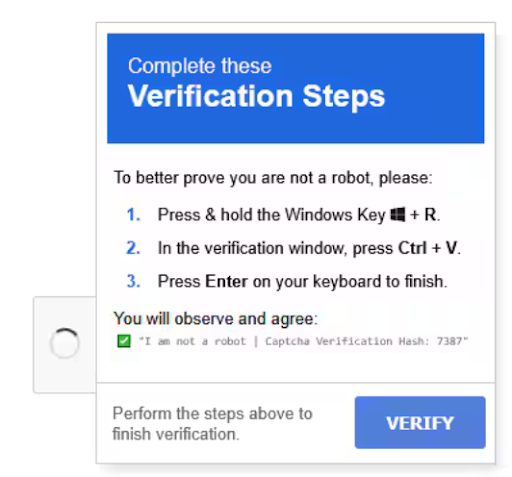
A common example is a fake CAPTCHA that tells users to press Windows+R, paste a command, and press Enter. The prompt looks like a security check, but the command can download and run malware. Similar instructions can appear in video captions, overlays, browser popups, or fake error messages.
This is the danger behind ClickFix attacks: instead of exploiting the visitor directly, attackers manipulate the visitor into running the malware themselves.
Never paste commands into a terminal, PowerShell, or the Run dialog because a website told you to. Close the page, verify the issue through the official software vendor, and remember that even a familiar or trusted website may be serving malicious content after it has been compromised.
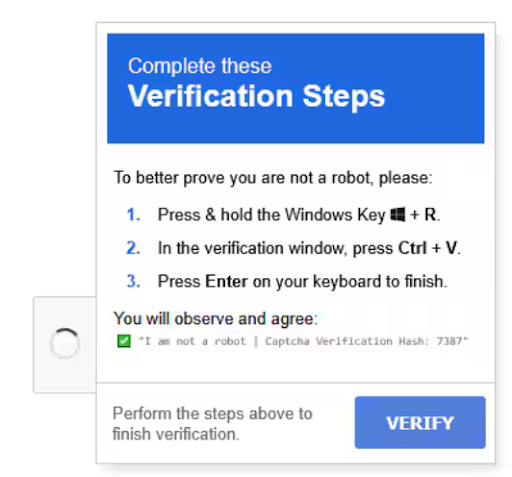
The image above is an example of a fake CAPTCHA prompt that uses this technique. Image: Lawrence Berkeley National Laboratory.